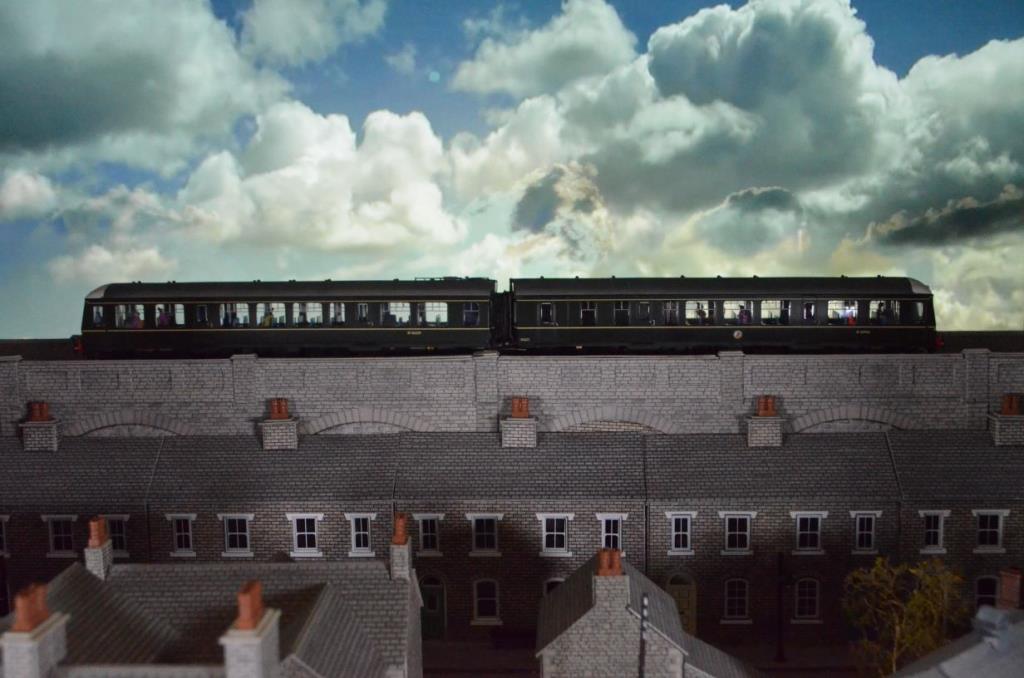
In the previous three articles in this series (Part 1, Part 2 and Part 3), we explained how we created the video backscene for our Bond Lane model railway exhibition layout using an old TV and a portable LED screen, along with several techniques to control the lighting and enhance the effects.
The final hurdle was how to get other elements — such as the streetlights — to react to the video and turn on and off at the right time.
For the main lighting, we had already used a light sensor that reacted to the brightness of the TV screen, effectively acting as a dimmer switch for the overhead LED lighting. This was almost what we needed for the streetlights, except that we wanted the opposite behaviour: the lights should come on when it was dark and turn off when it was light. This proved difficult to achieve, and even if we had worked it out, there would still have been further challenges. For example, during the lightning storm sequence, the brightness changes dramatically — which would probably have caused the streetlights to flicker if they were directly controlled in this way.
We considered using a timer, but accuracy was an issue because the video needed to loop for several hours at a time. Even being a split second out would eventually cause everything to drift out of sync. While trying to solve this problem, we almost went down the route of introducing a Raspberry Pi or Arduino to control this element — but that would have added unnecessary complexity, and even then, there wasn’t an obvious solution.
Eventually, the answer came to us — elegantly simple, and building on the techniques we were already using, so it wasn’t difficult to incorporate.
We were already using light sensors to monitor the screen for the overhead lighting, and we were already doing custom video editing for the backscene — both to build the sequence and to generate the blocks of colour used on the second screen to control the lighting. So, we added a few more blocks of colour to a section of the backscene that was hidden by the viaduct. We then placed light sensors in front of each of these colour patches and connected each one to a separate lighting circuit.
By changing those hidden colour blocks from black to white, they acted as dimmer switches for their respective circuits — just like the setup for the overhead lighting. In fact, one of these new control patches now governs the overhead lights, rather than relying solely on the overall brightness of the TV screen. The other two control the streetlights and the lights in the houses.
The two videos below show these techniques in action, including a moving black strip added to the colour blocks on some screens to simulate cloud movement and its effect on the lighting.
We use exactly the same method for the house lights, but control them independently of the streetlights, as they wouldn’t normally switch on at the same time. We’ve also added random timers to some of the house lights so that individual homes light up at different times — but still only within the period when the house lights are set to be on.
Ultimately, this technique could be used to control almost any element of the layout — even the movement of the trains themselves — and it’s something we’re keen to explore further, either on Bond Lane or perhaps a future layout where these ideas can be built in from the start.
For now, that’s all we have to share about our adventures in using a TV as a digital backdrop. Hopefully, something here has been useful for anyone thinking of trying something similar.
That said, there are still a few other innovations on Bond Lane that we’ll be sharing in future posts — including how we’ve installed cameras to monitor parts of the layout we can’t see while operating, and the different methods we use to control the trains on our viaduct. So please do check back soon!
by Neil Limbrick
195 views
7 days ago
by Neil Limbrick
5808 views
314 days ago
by Neil Limbrick
5280 views
2 years ago
by Neil Limbrick
4227 views
2 years ago
by Neil Limbrick
4158 views
2 years ago
by Neil Limbrick
3824 views
2 years ago
by Neil Limbrick
3473 views
2 years ago